






On 21 October a serious security flaw was fixed in PHP. PHP is the program on the hosting server that runs PrestaShop shops: it works on every page load. The flaw does not depend on the shop's settings, so it can affect any PrestaShop shop, small ones too.
An important difference: it is not PrestaShop that does or does not get a fix, it is PHP. The PHP project released official fixed versions only for the PHP versions it still supports; fixes for older PHP come from Linux distributions and long-term support (LTS) vendors. Each PrestaShop version, however, supports only certain PHP versions, so the PrestaShop version decides whether an official fixed PHP can run under the shop, or a fixed build of the old PHP is needed.
Not a technical person?In plain English: what is the problem?
Under the shop, a program on the hosting server serves every page. A serious flaw was found in it: outsiders can get into the shop through it, and such attacks are already happening.
The flaw has been fixed, but the fix has to be installed by the hosting provider. With a recent PrestaShop this is a routine update. With an old PrestaShop only a separately fixed version helps, and not every hosting provider has one.
What to do: send the question below to the hosting provider. If the shop runs an old PrestaShop, plan the upgrade as well, so that a routine fix is enough next time.
Question for the hosting provider
Has the PHP running under my shop received the October security fix (CVE-2026-109618, CVE-2026-109619)? If not, when will it be installed?
What does this mean in practice?
Through the flaw an attacker can get in without logging in, with a simple request, and in the worst case run their own program on the server. Customer data, orders and the shop itself can then be at risk.
According to security companies, the flaw is already being used in attacks, so it is worth dealing with now.
Which PHP has a fix?
- PHP 8.2, 8.3, 8.4 and 8.5: an official fixed release exists (8.2.35, 8.3.36, 8.4.27, 8.5.12). The hosting provider simply updates these.
- PHP 7.4, 8.0 and 8.1: no official new release. The PHP security team published a patch, and Linux distributions and LTS vendors provide their own fixed packages. The hosting provider can fix the old PHP with one of these.
- PHP 7.3 and older: no fix from the PHP project, not even a patch. Some Linux distributions (for example AlmaLinux, Ubuntu with extended support) and LTS vendors fixed their own old PHP packages; whether such a PHP runs on the server, the hosting provider can tell.
If the fix cannot go in right away, the PHP advisory also describes temporary settings that reduce the risk but do not remove it. The hosting provider can set these.
Which PrestaShop runs on which PHP?
| PrestaShop | Newest PHP it supports | Where the fix comes from |
|---|---|---|
| 9.1 | 8.5 | official fixed PHP release |
| 9.0 | 8.4 | official fixed PHP release |
| 8.0 – 8.2 | 8.1 | patch, distribution or LTS vendor |
| 1.7.8 | 7.4 | patch, distribution or LTS vendor |
| 1.7.7 | 7.3 | distribution or LTS vendor only |
| 1.7.6 and older, 1.6 | 7.2 or older | distribution or LTS vendor only |
The “newest PHP it supports” column comes from PrestaShop’s own system requirements (sources at the end of the article).
In short, by version:
- PrestaShop 9 Runs on an official fixed PHP release. It is enough if the hosting provider updates PHP to the fixed release. If the shop still runs on PHP 8.1, it has to move to 8.2 or newer first; PrestaShop 9 supports this.
- PrestaShop 8 and 1.7.8 Does not run on an official fixed PHP release, because the newest PHP it supports (8.1 and 7.4) no longer gets new releases. Here a fixed build of the old PHP protects: the patch, or the fixed package of a Linux distribution or LTS vendor. If that is in place on the server, the shop is protected against this flaw. In the long run, upgrading to PrestaShop 9 gives a PHP that the PHP project fixes itself.
- PrestaShop 1.7.7 and older, 1.6 Supports PHP 7.3 at most, for which the PHP project gives no fix at all, not even a patch. Protection comes from the PHP on the server having been fixed by the Linux distribution or an LTS vendor; the hosting provider can tell. In the long run, here too, upgrading to PrestaShop 9 gives a PHP that the PHP project fixes itself.
How do I see which version I have?
In the PrestaShop admin, on the Advanced Parameters > Information page. It shows the PrestaShop version and the PHP version. The PrestaShop version number is also shown in the top left corner, next to the logo.
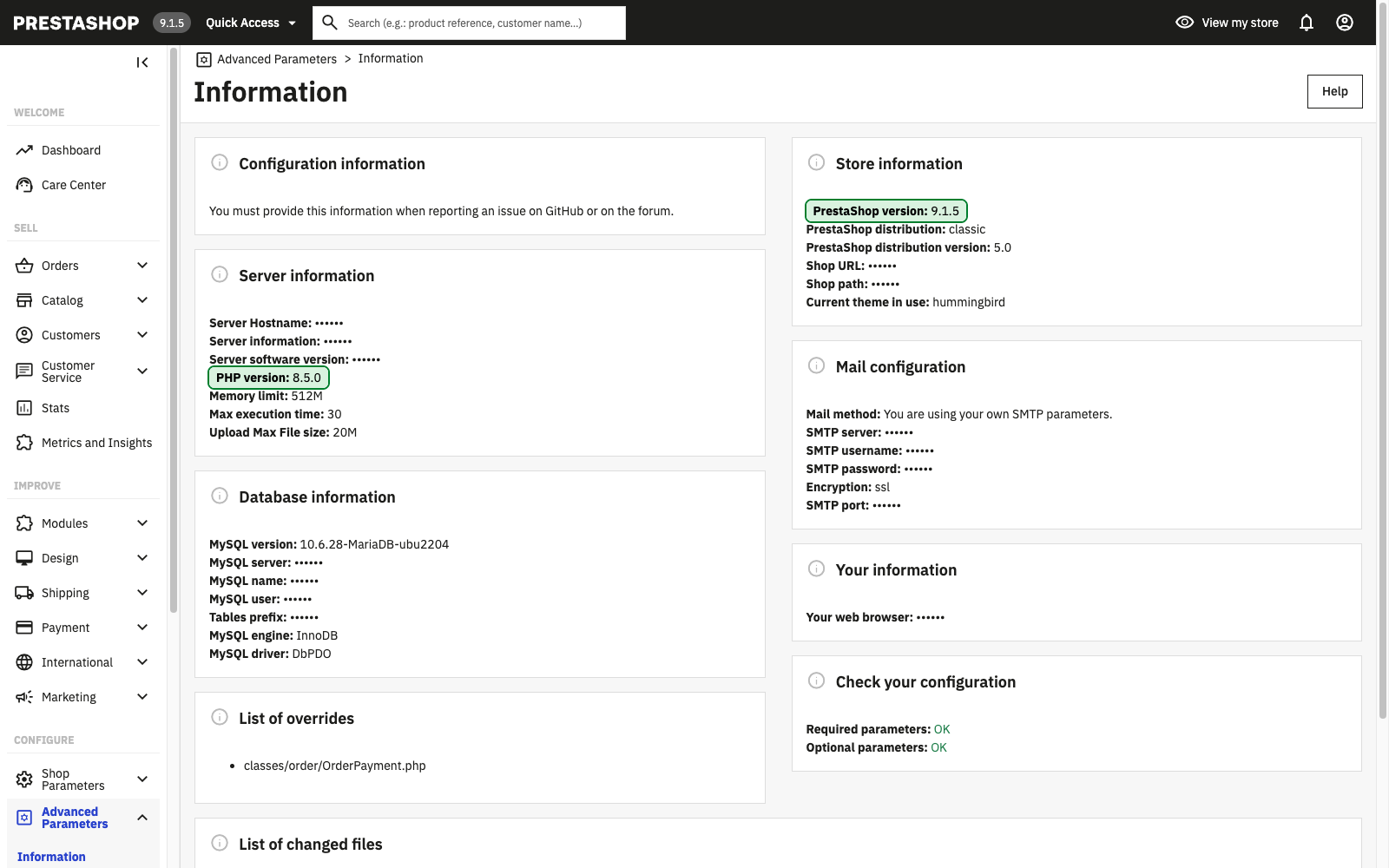
If unsure, the shop address is enough when applying for the upgrade; we check the version.
What to do now
There are two separate tasks: fixing PHP now, and upgrading an old PrestaShop as a planned project.
- Check the versions on the page above: PrestaShop and PHP.
- Ask the hosting provider in writing whether the PHP running under the shop has received the October security fix (an official fixed release, the patch, or the fixed package of the distribution or LTS vendor).
- Plan the upgrade to PrestaShop 9 if the shop runs an older version. Only PrestaShop 9 runs on a PHP that the PHP project fixes itself; under an older PrestaShop, every future PHP flaw means waiting for a fix from the distribution or an LTS vendor. The upgrade touches the theme, the modules and the data, so it is prepared on a test copy first and goes live only after checking.
PrestaShop upgrade to PrestaShop 9
Upgrading the shop together with its theme, modules and data, prepared on a test copy.
Frequently asked questions
Is it enough if the hosting provider updates PHP?
On PrestaShop 9, yes. An older PrestaShop does not run on the official fixed PHP releases; there a fixed build of the old PHP is needed (the patch, or a distribution or LTS vendor package), which the hosting provider can install.
Is it enough to upgrade to the latest PrestaShop 8?
Not for this flaw. PrestaShop 8 supports PHP 8.1 at most, for which the PHP project no longer releases new versions; here too the fix comes from a patch built into the old PHP or a distribution or LTS vendor package.
How urgent is it?
Ask the hosting provider now, because the flaw is already being attacked. The upgrade to PrestaShop 9 is worth doing after that as a planned project; on PrestaShop 1.6 and 1.7.7 soon, because there the PHP project gave not even a patch, and the fix depends entirely on where the PHP on the server comes from.
Sources: PHP security advisory, Tenable, php.net, AlmaLinux, Ubuntu, system requirements of PrestaShop 9, PrestaShop 8 and PrestaShop 1.7


Comments
No comments yet.