






Several critical flaws have been made public over the past months that let an outsider take over a shop without logging in: in the default filter module, in the contact form, and in the page builder that ships with many commercial themes. This article goes through each one: who is affected, how to check, and how it is fixed.
Not a technical person?The short version: what is wrong, and what needs doing?
PrestaShop and some widely used modules have known flaws that let strangers get into a shop without a password and reach orders, customer data or the server itself.
These have to be fixed on the shop: by updating, or, where an update is not an option, by applying the fix to the version already running.
What to do: ask whoever maintains your shop whether the points below are covered. If nobody does, you can ask us to review the shop with the form further down.
Questions for your developer
Which version of the Faceted Search module is installed, and is it 4.0.4 or later? Has the contact form flaw (CVE-2026-44212) been fixed, either by updating PrestaShop or with the official hotfix module? Does the shop have Ap PageBuilder or any other Leo theme module, and which version? Are there modules left on the server that are no longer in use?
Which PrestaShop flaws are critical right now?
| Flaw | What it allows | Affected | Fix |
|---|---|---|---|
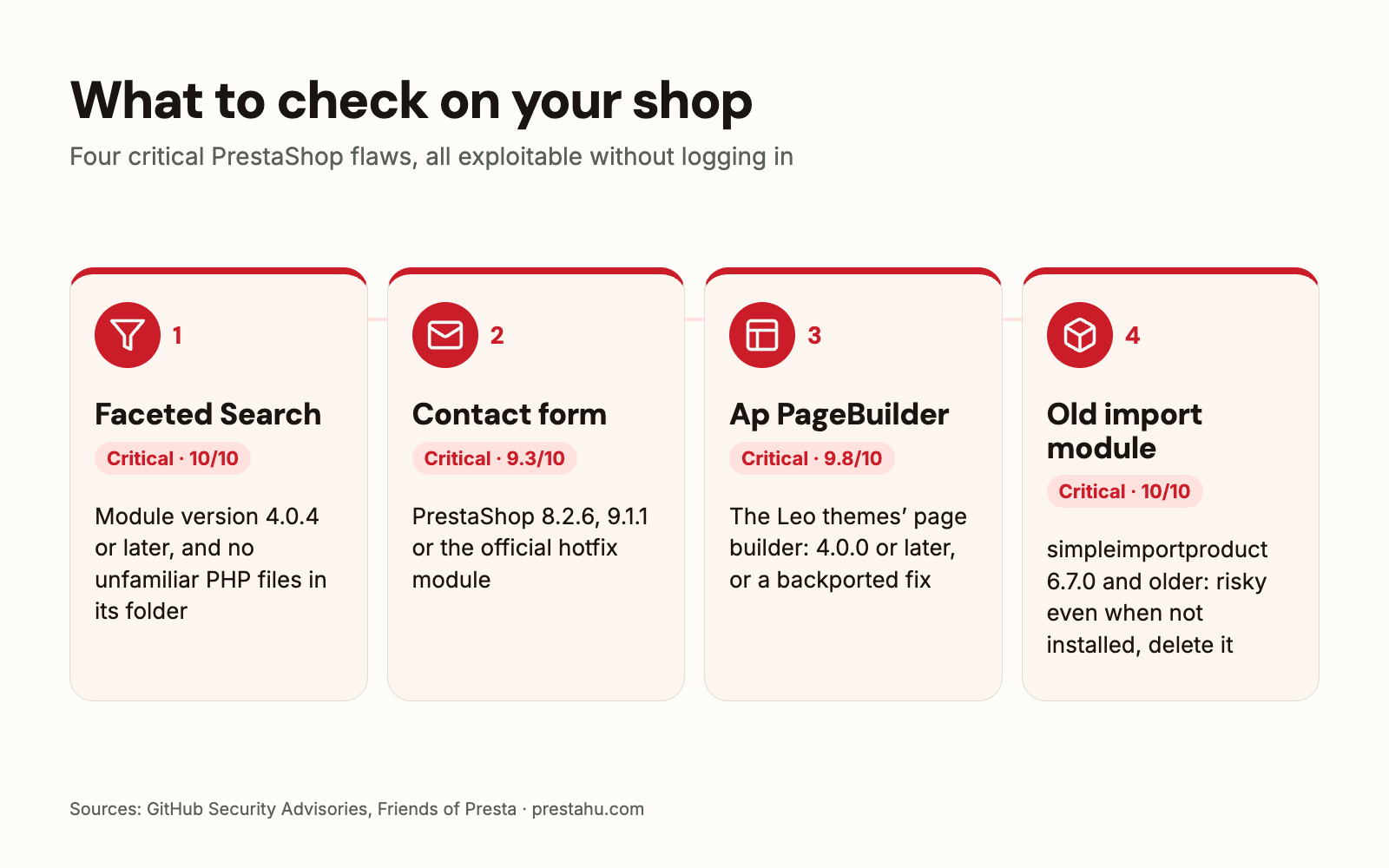
| Faceted Search filter module CVE-2026-54159, 10/10 | running code on the server without logging in | module 3.0.0–4.0.3, when the filters include a price or weight slider | module 4.0.4 |
| Contact form CVE-2026-44212, 9.3/10 | taking over the back office through a submitted message | every PrestaShop before 8.2.6, and 9.0.0–9.1.0 | 8.2.6, 9.1.1 or the official hotfix module |
| Ap PageBuilder (Leo themes) CVE-2022-22897, 9.8/10 CVE-2024-6648, 8.7/10 | database access; reading any file on the server | 2.4.5 and older; before 4.0.0 | a newer module version or a backported fix |
| Product import module (simpleimportproduct) CVE-2024-25846, 10/10 | uploading a PHP file without logging in | 6.7.0 and older, even when not installed | a newer version, or deleting the module from the server |
The score is the industry-standard severity rating (CVSS); anything above 9 counts as critical. Each flaw has a public advisory, linked at the end of the article.
What is wrong with the Faceted Search filter module?
Faceted Search is PrestaShop's default filter module, the one shoppers use on category pages to narrow products down by price, brand or feature. In versions 3.0.0 to 4.0.3, a single request from someone who is not logged in could run code on the server, which can lead to a full takeover of the shop and the server. In practice, attackers usually drop their own PHP file into the module's folder.
Every shop running version 3.0.0 to 4.0.3 of the module is affected if its filters include a price or weight slider. The fix is version 4.0.4 of the module, released on 3 June 2026. If the module cannot be updated because the PrestaShop version is too old, the fix can be applied by hand to one file of the installed version.
If your shop ran an affected version, PrestaShop recommends checking for signs of a break-in: unfamiliar PHP files in the modules/ps_facetedsearch/ folder. If you find any, updating the module is not enough and the shop needs a proper investigation.
What is wrong with the contact form?
Anyone could submit the public contact form with an email address that had code hidden in it. When a staff member opened that message in the back office under Customer Service, the code ran in their browser and the attacker could take over their session, with access to orders, customer data and settings, no password needed.
The flaw is in PrestaShop's own code, so it affects every version before 8.2.6, including 1.7 and 1.6. There is no setting that works around it. It is fixed in 8.2.6 and 9.1.1, and for shops that cannot update, PrestaShop released an official hotfix module that works on 1.7, 8 and 9. On 1.6 and other versions the hotfix does not support, the fix has to be applied by hand to the back-office template.
What is the problem with Ap PageBuilder and Leo themes?
Ap PageBuilder (appagebuilder) is a page builder module bundled with many commercial PrestaShop themes, mostly those by Leo Theme and Apollo Theme. Shop owners often have no idea it is installed. It has two known critical flaws:
- 2.4.5 and older: the database can be read and changed without logging in, which can lead to admin access and leaked customer data (9.8/10).
- Before 4.0.0: any file on the server can be read without logging in, including the shop's configuration and its database password (8.7/10).
Attack code for both is public, and according to the Friends of Presta security group the encoded requests may get past most web application firewalls. On the shops we have reviewed, other Leo modules that come with the theme (slideshow, quick login, blog) also needed fixing, so it makes sense to check the theme's modules together.
Why is an old, unused module a risk?
Disabling or uninstalling a module can leave its files on the server, and the module's PHP files still run when called directly, even after PrestaShop has forgotten about the module. Our article on module risks explains the difference between disabling, uninstalling and deleting.
A case in point is the simpleimportproduct product import module: in version 6.7.0 and older, anyone could upload a PHP file to the shop. Friends of Presta reports that this flaw is being used to plant card-skimming code on shops at scale. One shop we investigated was broken into through exactly this kind of import module, left on the server without being installed.
What if my PrestaShop is too old to get updates?
PrestaShop published the fixed releases in the 8.2 and 9.1 branches (8.2.6 and 9.1.1). On an older shop (1.6, 1.7, 8.0–8.1) a full upgrade touches the theme and the modules as well, so it cannot always happen straight away. In that case the fix can be backported to the version you run: the vulnerable file is changed to match the patched one, and the rest of the shop stays as it is. Our overview of 2026 security updates lists the fixes in the supported branches release by release.
The long-term answer is still an upgrade to a supported version, because only there does the fix for the next flaw arrive on its own.
What should I do now?
- Check the Faceted Search version under Modules > Module Manager. If it is below 4.0.4, update it or apply the fix, and look for unfamiliar PHP files in the module's folder.
- Fix the contact form flaw by updating to 8.2.6 or 9.1.1, or with the official hotfix module. Until then, be careful when opening Customer Service messages.
- Go through the theme's modules: is there Ap PageBuilder or another Leo module, and which version.
- Delete unused modules from the server, especially old import and export modules.
October's PHP flaw is a separate matter that your host fixes; our article on the PHP flaw covers it.
Frequently asked questions
How do I find out which PrestaShop version my shop runs?
In the back office, under Advanced Parameters > Information. The contact form flaw needs fixing on every version before 8.2.6 and on 9.0.0–9.1.0.
How do I know whether Ap PageBuilder is on my shop?
Search for it under Modules > Module Manager, with disabled modules shown too. If its files are on the server without the module being installed, you will only see them in the modules folder on the hosting account.
How urgent is this?
The Faceted Search and contact form flaws can be exploited without logging in and the details are public, so they are worth fixing now. A full PrestaShop upgrade can follow, planned.
What if the shop has already been hacked?
Then updating is not enough: the attacker's files and any admin account they created have to be found and removed, and passwords and secret keys replaced. Our review covers that too.
Sources: Faceted Search advisory (GitHub), PrestaShop: Faceted Search update, Contact form advisory (GitHub), PrestaShop 8.2.6, Friends of Presta: Ap PageBuilder (2023), Friends of Presta: Ap PageBuilder (2025), Friends of Presta: simpleimportproduct

Comments
No comments yet.