


A first PrestaShop installation shows well over a hundred entries on the modules page, and the natural conclusion is that the shop is more or less finished. Invoicing, parcel labels, card payment, ad measurement all appear to be there. Then the first order arrives, the courier details have to be retyped by hand, and card payment cannot even be offered.
This article takes the official installation package apart: what is actually inside, what it is good for, and which features merchants assume are built in when they are not. The figures come from the 8.2.8 release file and the 9.2.0 package definition, not from a description or from memory.
Not a technical person?The short version: what is in the box?
The PrestaShop package gives you a working storefront and a detailed back office. Most of the modules do one of two things: they draw reports on the dashboard, or they place blocks on the storefront, such as featured products, a banner or a newsletter sign-up form.
What runs the daily work is not included. There is no card payment, no courier connection, no accounting connection, and no ad measurement beyond a basic visitor report that can be switched on.
This is how the system is built rather than a flaw: the core is the same everywhere, and local service providers arrive as modules. So when a shop starts, it pays to work out how customers will pay, who will deliver and what will issue the invoices, instead of assuming it is all there.
How many modules does the downloaded package really contain?
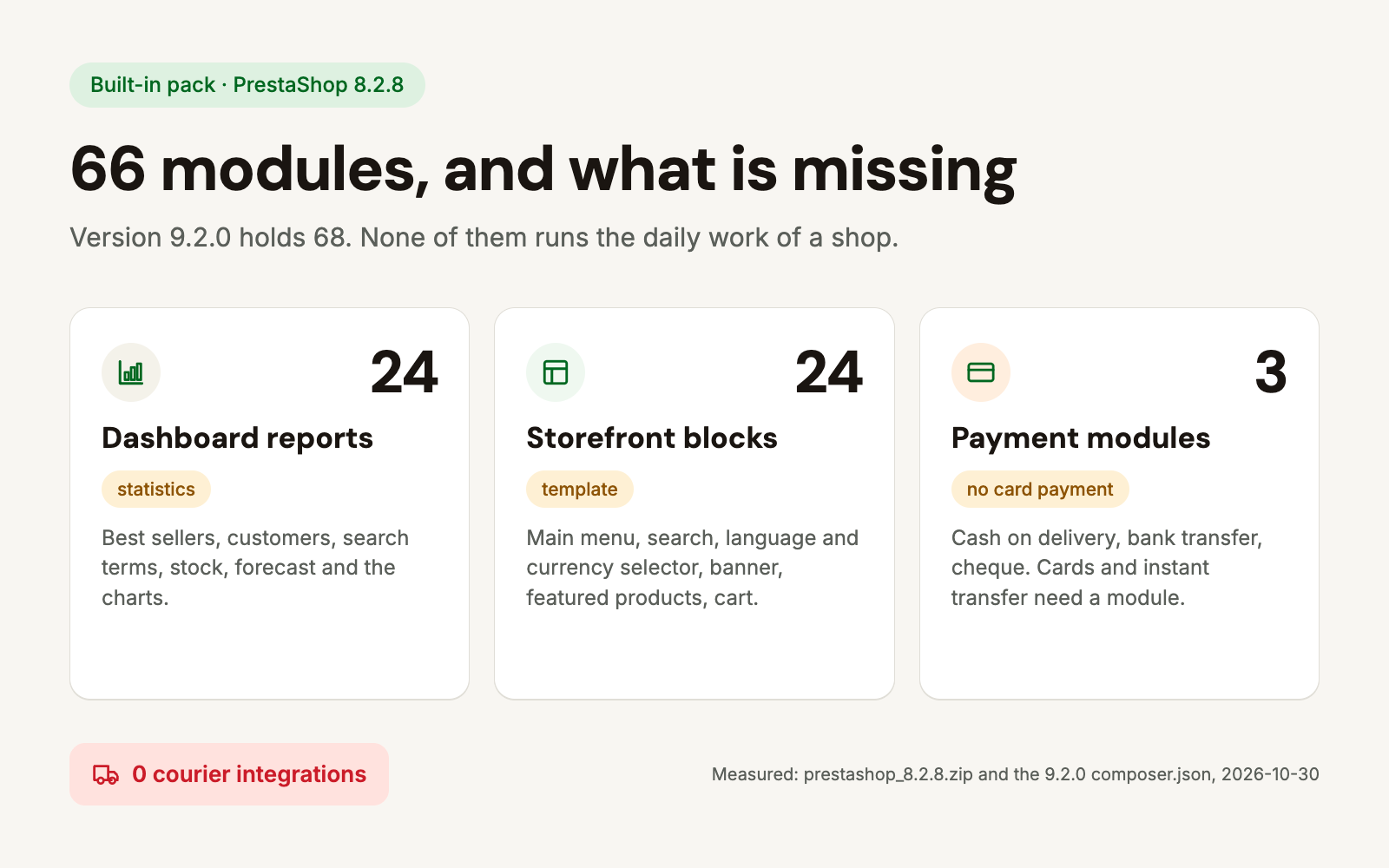
The modules folder of the 8.2.8 installation file holds 66 modules. In 9.2.0 there are 68, because two were added: a one-page checkout and an API resources package. That is everything a fresh installation starts with.
The contents are not a random selection. A release is built from the source tree plus the modules the dependency manager brings in, and the release builder downloads no extra modules on top. That matters, because much of what merchants believe to be built in does not come from this package at all: it is installed afterwards, often from PrestaShop's own marketplace.
Why are two thirds of the modules reports and storefront blocks?
Of the 66 modules, 24 belong to the dashboard reports: best-selling products, best customers, search terms, stock, forecast, and the chart renderers they use. Another 24 provide the storefront blocks: main menu, search bar, language and currency selector, banner, featured products, cart icon, brand list, social icons.
Those two groups are nearly three quarters of the package. They are usable, and they give a new shop an acceptable storefront, but none of them performs a business operation. They do not hand over a parcel, issue an invoice, take money or measure advertising.
Which payment methods does the package support?
Three, and none of them is a card:
- Cash on delivery paid to the courier on handover.
- Bank transfer to the account details shown at checkout, reconciled by hand.
- Check payment displays the details needed to write a cheque at checkout.
Cards, instant transfer, instalments and digital wallets all need a module. One option is Barion Payment, which adds card payment through the Barion Smart Gateway to PrestaShop 1.7, 8 and 9. The decision itself is not a technical one: card acceptance fees and the payout schedule drive it.
Is there a built-in connection to couriers?
No. PrestaShop itself handles carriers: weight and price ranges, shipping fees, a free-shipping threshold, pickup options. What it does not do is talk to the carrier's own system. The tracking number, the label, the pickup-point selector and the status feedback are in none of the built-in modules, and courier integration is not part of the package at all.
That means every order needs its data retyped into the carrier's interface, with the address typed twice. Across European markets the GLS API, DPD integration and Packeta integration close that gap: the order goes out, the pickup point is chosen at checkout and the label is downloaded from the shop.
What does the built-in Google Analytics module measure, and what does it miss?
The built-in measurement module is a GA4 one, and it sends nine shopping events: item view, list view, add to cart, remove from cart, checkout start, payment info, purchase, login and sign-up. For a new shop that is a usable baseline.
Three things it does not do. It sends no consent signal to Google, so whatever the cookie banner decided never reaches the measurement code, and the code loads unconditionally on page load. It passes no Google Ads conversion, so the ad account does not see the purchase on its own. And there is no Meta pixel in the package at all.
The cookie banner is not built in either. The GDPR module in the package is not a consent manager: it handles access and erasure requests for customer data, with a consent checkbox. A cookie manager, and the measurement conditions that go with it, has to be solved separately.
What does PrestaShop 9 add here?
Two modules. One is the one-page checkout, which until now required a separate module. The other is the API resources package, which serves external access to the shop's data; that matters when a warehouse or accounting system reads the orders.
The three gaps above are gaps in version 9 as well: card payment, carrier connection and ad measurement are not in that package either.
What is worth doing now?
- Look at the checkout as a customer: what can someone actually pay with today. If only transfer and cash on delivery are offered, that is where the largest lost revenue sits.
- Work out how much time manual parcel handover takes. Five minutes per order over a hundred orders is more than eight hours a month.
- Check whether advertising can see the purchase. With only a visitor report in place, ad spend cannot be measured back.
- List who receives an email after a purchase and what sends it. The package can notify about stock and order changes; abandoned-cart and follow-up emails it cannot.
- Settle cookie consent and measurement together, not separately. A banner on its own does not stop the measurement code.
Missing a connection no module covers?
When a shop has to talk to a system with no off-the-shelf solution (an in-house warehouse, a supplier price list, custom invoicing), we build it as a dedicated module that keeps working after upgrades.
How many modules come with PrestaShop?
The official 8.2.8 installer holds 66, version 9.2.0 holds 68. Of those, 24 belong to the dashboard reports and 24 to the storefront blocks.
Can PrestaShop take card payments after installation?
No. The package offers cash on delivery, bank transfer and check payment; accepting cards needs a payment module.
Do the built-in modules cost anything?
No, the modules in the package are part of PrestaShop. Some of the vendor and third-party modules on the marketplace are paid.
Is the built-in Google Analytics module enough to measure advertising?
No. It sends shopping events to GA4, but it passes no Google Ads conversion, contains no Meta pixel and sends no consent signal.
Does PrestaShop 9 ship more modules?
Two more: a one-page checkout and an API resources package. The payment and shipping gaps are unchanged.
Sources: PrestaShop 8.2.8 release, PrestaShop 9.2.0 composer.json, ps_onepagecheckout, ps_googleanalytics, psgdpr