






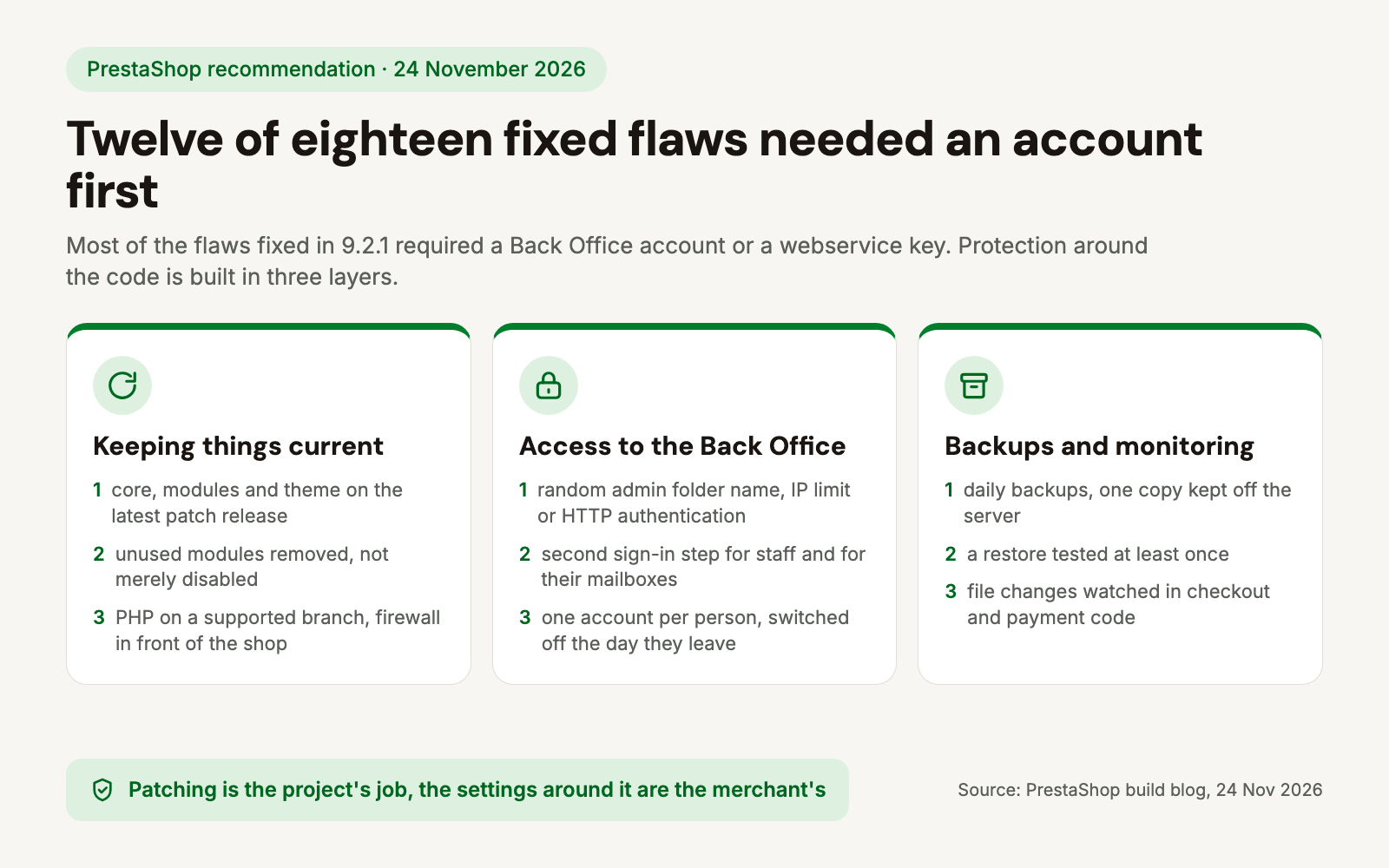
On 24 November 2026 the PrestaShop project published the protective measures it recommends most often for the shops around the software. The announcement opens with a number: of the eighteen vulnerabilities fixed in 9.2.1, twelve could only be exploited with a Back Office account or a webservice key. How much damage a flaw can do therefore also depends on how well everything around the code is protected.
Fixing flaws in the software is the project's job; protecting the shop around it sits with the merchant, the developer and the hosting provider. This article goes through what is worth setting up beyond updates: how the Back Office becomes hard to reach, when built-in two-step sign-in arrives, why passwords should not be changed every 90 days, and what protects the database, the files and the backups.
Not a technical person?The short version: what has to be set up around the shop?
The software itself is patched by its makers, while the settings around it belong to whoever runs the shop. Most attacks are not sophisticated: stolen or guessed sign-in details get someone into the administration area, or a file is found on the server that should not be there at all.
Three things carry most of the weight: who can sign in to the administration area and how, what is kept current on the server, and whether a working, tested backup exists. Sign-in and staff accounts are the merchant's call; the server-side settings are shared work with the hosting provider.
What to do: review the staff accounts (one person, one account; access switched off the day someone leaves), turn on a second sign-in step, and ask the hosting provider the four questions below.
Questions for the hosting provider
We are reviewing the security settings of our shop and would like your help on four points. 1. Is there a web application firewall (WAF) in front of the shop, and if so, is the server's IP address reachable only through it? 2. Can access to the administration folder be restricted by IP address, or can HTTP authentication be placed in front of it? 3. Does the database accept connections only from the web server, and is phpMyAdmin or Adminer publicly reachable? 4. How often are the files and the database backed up, is a copy kept off the server, and when was a restore last tested?
Why do the settings around the code matter most?
A severity score says what an attacker can do once every condition is met. Those conditions usually come from around the shop: a staff account that was taken over, a webservice key that leaked, an old module that no longer runs while its files are still there. The announcement therefore thinks in layers: when one layer fails, the next one is still standing.
The layer most often left out is a web application firewall in front of the shop. It filters malicious requests before they reach PrestaShop and, as the announcement puts it, does not stand in for updates: it buys time between the disclosure of a flaw and the moment the patch is in place. One thing decides whether it works: if the server's IP address stays directly reachable, the firewall can simply be bypassed, so ports 80 and 443 should only accept requests from the provider's addresses.
What has to stay current, and what is left as code on the server?
Most PrestaShop security advisories concern modules rather than the core. Updating therefore does not stop at the core, and a fix only protects the shop once it is installed.
- Core, modules, theme on the latest patch release of their branch, which is a drop-in change and often carries security fixes.
- Unused modules removed, not merely disabled: a disabled module is still code on the server, and the announcement notes its files may still be reachable.
- Cracked, "nulled" modules never: backdoors in them are, in the project's words, designed to stay invisible.
- PHP on a supported branch, because an end-of-life PHP no longer receives security fixes.
What is missing on a given shop is listed by the PrestaShop security scan module: it goes through the core, the modules and the theme, and shows where the shop lags behind the published fixes. Installing those fixes is the job of the PrestaShop security fixes module, with a backup taken first.
How does the Back Office become hard to reach?
The Back Office holds customer data, orders and payment configuration, and modules can be uploaded from it, which in practice means running code on the server. That is why it gets several layers.
The first is the name of the admin folder: the installer gives it a random suffix, and that suffix is worth keeping, because /admin or a folder renamed after the company is what automated scanners hammer all day. It does not stop a targeted attacker, but it removes the shop from the bulk of machine-driven attempts.
The second is narrowing access. Where the team works from fixed IP addresses (an office, a VPN), only those should reach the Back Office. Where addresses change, HTTP authentication in front of the folder adds a second password prompt that is independent of PrestaShop: bots trying leaked PrestaShop credentials never even reach the sign-in form. After either change the integrations have to be tested, because some modules, payment providers and external tools call URLs inside the admin folder and will need an exception.
The third is order among staff accounts: one account per person (a shared account loses traceability and cannot be revoked for one individual), permissions limited to what the role needs, and accounts switched off the day someone leaves, agency and freelancer accounts included. The password policy and the active sessions are managed on the Advanced Parameters > Security page.
A staff member's mailbox is part of the Back Office: password recovery and email-based second steps both pass through it. If that mailbox has no second sign-in step, the announcement calls it the weakest link.
When does built-in two-step sign-in arrive?
According to the announcement, native Back Office two-factor authentication is planned for PrestaShop 9.3, contributed by Paolo Cunti of Codencode, and the submitted change is still under review. The work includes one-time codes sent by email or generated by an authenticator app, trusted devices, backup codes and rate limiting on code verification; it is switched on shop-wide and then activated by each employee in their own profile.
Until then the second step comes from a module. With Two-Factor Authentication (2FA) for PrestaShop the password is followed by a code from an authenticator app, a passkey, a security key or an email code; the step can be made mandatory per profile, per employee and per customer group, and there is an orderly way back after a lost device.
Why not change passwords every 90 days?
Most written policies still say the opposite. The reference standard, NIST SP 800-63B in its fourth revision, now states that subscribers shall not be required to change passwords periodically, while a change shall be forced if there is evidence that the credential has been compromised. The UK's NCSC reached the same conclusion: organisations should not force regular password expiry, because the more often users have to change passwords, the greater the overall vulnerability to attack.
The reason is what forced changes do to people: instead of a strong new password, they pick a predictable variation of the old one. The announcement cites a study of more than 7,700 accounts, and Microsoft removed password expiration from its Windows security baseline in 2019 for the same reason.
- 17% of accounts had the new password guessed within five attempts
- 41% of passwords were cracked offline within seconds
- 7,700 accounts in the study
Instead: long passwords, different for every service, kept in a password manager (uniqueness is what protects the shop when another site is breached); a second sign-in step wherever it is available; and an immediate change when there is a reason for one (a breach, a click on a phishing email, malware on a laptop, someone leaving the team). The Back Office measures password strength with the zxcvbn library, which estimates how guessable a password is rather than checking for an uppercase letter and a digit.
What protects the database and the files?
| Setting | What it gives |
|---|---|
| Custom table prefix default ps_ | ready-made injection payloads blindly target ps_employee and ps_customer; with a custom prefix they fail. It does not fix a vulnerability, it rules out the copy-paste attempt. |
| Database not reachable from the internet | on a single machine, connections bound to the local address (bind-address = 127.0.0.1); on separate machines, a private network and a firewall rule for the web server's address. No publicly reachable phpMyAdmin or Adminer. |
| Dedicated database user | privileges on its own schema only, never on every database of the server. |
| Debug mode off | on a live shop, error messages leak paths, version numbers and sometimes credentials. |
| A tidy web root | the install folder deleted, and no .git, .env, SQL dump or backup archive left behind: scanners, the announcement says, look for exactly those. |
| File access with keys | SFTP or SSH with keys rather than plain FTP, and PHP execution blocked in upload folders. |
What are backups and monitoring for?
Backups follow the 3-2-1 rule: three copies, two media, one off-site. The last part is the point, because if an attacker gets onto the server, backups stored there can be lost too. Files and database backed up daily, and a restore tested at least once: a backup that has never been restored is, in the project's words, a hope rather than a backup.
Monitoring pays off in two places. Watching file changes in the checkout and payment templates and their JavaScript matters because card skimmers usually live there and customers cannot see them. The other is the logs: Back Office sign-ins, firewall events and unusual admin actions are useful when somebody actually reads them.
What is worth doing now?
- Review the staff accounts: whether a shared account exists, whether any access belongs to finished work, and whether everyone has only the permissions their role needs.
- Turn on the second sign-in step in the Back Office and on the staff mailboxes as well.
- Drop mandatory periodic password changes from the policy, and use long, unique passwords in a password manager instead.
- Remove unused modules, and bring the core, the modules, the theme and PHP to the latest patch release of their branch.
- Settle the four hosting questions: the firewall and direct reachability of the server, access to the admin folder, access to the database, and how often backups run and when a restore was last tested.
Frequently asked questions
Is updating PrestaShop enough?
Updating is the single most important step, but the announcement states that of the eighteen flaws fixed in 9.2.1, twelve could only be exploited with a Back Office account or a webservice key, so protecting sign-ins and keys belongs in the same line of work.
Which step is worth starting with?
Access to the Back Office: who can sign in, from where, and whether a second step is required. The announcement notes that most items take less than an hour and suggests picking two or three in a week rather than all of them at once.
Is disabling an unused module enough?
No. The announcement states that a disabled module is still code on the server and its files may still be reachable, so unused modules should be removed.
What to do while the shop runs without two-step sign-in?
The native solution is planned for 9.3 and the submitted change is still under review. Until then the second step can be switched on with a module, both for the Back Office and for customer accounts.
Sources: PrestaShop: Security hygiene for your PrestaShop store, NIST SP 800-63B, revision 4, NCSC: The problems with forcing regular password expiry, PrestaShop security advisories